
Florida dealer out-the-door price checklist for used cars
Quote the vehicle and dealer charges, calculate sales tax and county surtax on the correct base, then add the applicable title, registration and plate charges. Check the buyer’s address and plate record before treating the estimate as final.
Estimate Florida tax and registration
Build one quote that the next desk can reproduce
The customer’s first question is practical: “What will it cost to get this car home?” An independent used-car dealer can answer that before the contract is printed by separating the deal into four parts: the vehicle and dealer charges, any qualifying trade allowance, taxes, and charges tied to the title and tag. Keep financing and the cash due today on their own lines. The desk should be able to explain each number without asking the customer to reverse-engineer a monthly payment.
Give every quote a stock number, quote date, proposed delivery date, buyer’s registration county and selected plate scenario. A short note such as “confirm eligible Florida plate record at delivery” tells the next employee exactly what could move. If the registration county is unresolved, send the vehicle subtotal first and list the tax and tag portion as pending. This helps the next desk resolve a missing field without rebuilding an offer from memory.
Use the same price worksheet for a phone lead, a returning buyer and a walk-in. A customer who screenshots a listing should see the connection between that listing and the written offer. The workflow below fits an ordinary Florida retail purchase for Florida registration. An out-of-state purchaser, a claimed exemption, a special plate or an ambiguous trade deserves a separate review before the final documents are prepared.
Reconcile the written offer with the advertised vehicle
Open the listing you published for the actual stock number. Section 501.976 addresses vehicle identification and the fees and charges customers must pay in an advertised price, with specific treatment for taxes and government title, tag and registration fees. When an unavoidable dealer charge is in the quote, ask the person responsible for advertising to verify how it was treated in the listing before you send the offer. This checkpoint also applies when a syndicated listing has stale copy.
The public listing and the detailed price breakdown serve different purposes. The first is a price presented against an identified vehicle. The second can show how that amount is made up, alongside the consumer’s choice of optional products and separately identified government charges. A conditional discount needs a condition the buyer can understand before arrival. Keep the written disclosure language in the dealer’s approved forms and review changes with whoever handles compliance. This guide’s price categories do not authorize any particular fee or disclosure format.
Consider a car with two keys, an installed accessory and an optional service contract. Document how the installed item is priced and whether it is part of the advertised cash price. Then ask the buyer about the elective product separately. Putting them together in a generic “protection” field makes the customer’s response ambiguous and gives accounting too little information to classify what was sold.
Classify each line before calculating Florida tax
The Department of Revenue’s motor-vehicle guide treats charges such as dealer preparation, settlement or closing fees, and dealer-required expenses as part of the taxable sales price. It also distinguishes separately itemized charges mandated by state law for title, licensing, registration and recording a lien. A supplier or vendor service shown under a tag heading can still need its own classification. A clear label and a mapped accounting code let the desk trace the treatment when a customer asks why it differs from a government charge.
Create an approved list in the quoting system showing the name, charge owner and tax treatment for each line. If a number sits in an unclassified bucket, leave that quote in review. Recheck optional products against your accounting policy and revenue guidance rather than using a general “tax everything” switch. The tax basis should be visible on a printed worksheet even when the agreement itself uses a different presentation.
For example, the title clerk may have an exact amount for an electronic title while the salesperson knows a preparation charge already included in the cash price. The worksheet should make it impossible to add the preparation charge again or reduce tax by putting it in the county fee column. Record a change as a revised offer with an explanation, so a second employee can reconstruct what the customer previously saw.
| Worksheet line | What to verify |
|---|---|
| Selling price and mandatory dealer charges | Match the listing and approved contract disclosures. Determine taxable components. |
| Optional products | Record the customer’s choice and confirm separate tax treatment. |
| Qualifying trade allowance | Capture allowance and payoff as separate numbers. |
| Title, tag and registration | Separate state-mandated itemized lines from private services. |
| Cash due or balance financed | Show deposits, payoff and financing after the price breakdown. |

Use the buyer’s registration address for county surtax
For a motor vehicle, the purchaser’s address used on the registration or title drives the county surtax under DOR guidance. The county where the showroom is located can differ from the buyer’s county. A mailing address for bills, a temporary address and the town included in a ZIP may also diverge from the place shown in the title application. Ask for the address the buyer will use to register, and verify an uncertain county boundary through the revenue department’s jurisdiction lookup.
Check the applicable effective date for the county rate. A rate heard at another dealership and a rate used in a transaction last year can both be out of date. The ordinary motor-vehicle surtax applies only to the first $5,000 of the taxable amount, while the general Florida state sales tax calculation applies to the taxable base. Tax adjustments, exemptions and reciprocity should go through someone who can verify the transaction against the current DOR guidance.
If the buyer moves during the negotiation, redo this part before publishing a revised number. Note the change in an ordinary sentence, such as “the county line changed when we confirmed the address for the title.” Explain whether it moved only the local tax or also affected local tag-office choices. A shopper comparing online quotes from two counties should be able to ask each seller to estimate the same registration address.
Keep trade allowance and loan payoff separate
In a qualifying transaction, a registered dealer may deduct the trade-in allowance from the taxable sales price under DOR guidance. Start with the gross allowance supported by the buyer’s order and the actual trade that forms part of the transaction. Record outstanding debt separately so the desk can explain equity and the amount that may be financed. Tax treatment depends on the sale and trade arrangement, while a lender payoff changes how the deal is settled.
Take a fictional quote with a $15,000 vehicle price, $600 in taxable dealer charges already reflected in the advertised cash price and a qualifying $4,000 trade. The assumed taxable base is $11,600. At the general state rate of 6%, that gives $696 of state tax. In a hypothetical county with a 1% rate, the $5,000 surtax cap creates $50 of county tax, for $746 of tax in this example. Government tag and title charges still have their own lines. The example uses an illustrative county rate to show the calculation.
Now suppose the trade lender is owed $4,800. The gap between that payoff and the allowance is $800, which belongs in the deal settlement and potentially the financing discussion. Keep the tax computation attached to the qualifying allowance and review the underlying facts before treating any trade as eligible. If the vehicle is sold elsewhere, arrives under a different owner or is taken in a separate transaction, reopen the tax calculation before using the earlier quote.
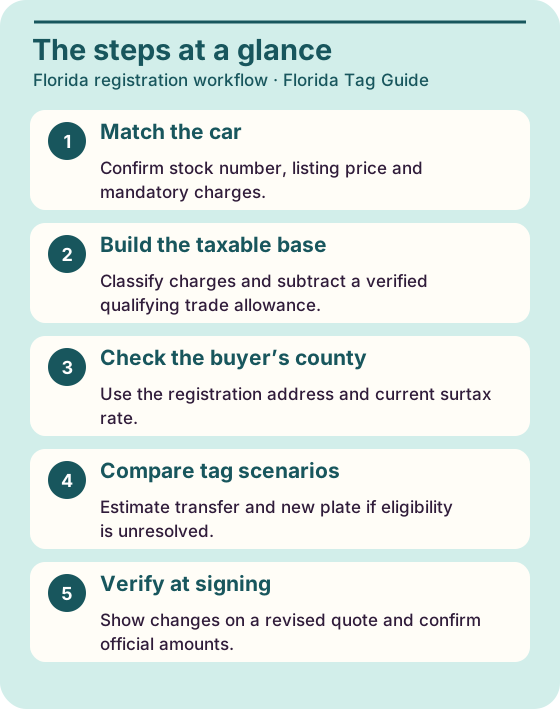
Read the steps as text
- Match the car Confirm stock number, listing price and mandatory charges.
- Build the taxable base Classify charges and subtract a verified qualifying trade allowance.
- Check the buyer’s county Use the registration address and current surtax rate.
- Compare tag scenarios Estimate transfer and new plate if eligibility is unresolved.
- Verify at signing Show changes on a revised quote and confirm official amounts.
Price a Florida plate scenario the customer can verify
Ask whether the buyer has an active Florida plate that will be transferred, a Florida plate record from a previously owned vehicle, or no known eligible record. Write the answer as a provisional scenario. The $225 initial registration fee generally applies when the customer lacks an eligible previous Florida plate or plate record for transfer and no exception applies. Other registration charges depend on the vehicle and the transaction. An eligible record and the physical metal plate in a customer’s hand also present different things to verify.
A salesperson can show transfer and new-plate budgets side by side for a buyer who has yet to bring the registration. Make the more expensive outcome easy to see. Ask the title clerk what evidence the customer should provide and confirm what happens if the source car remains in use. Avoid promising that a family member’s tag, another state’s plate or a plate still assigned to a retained car can be moved to the new vehicle.
Record the quote assumption in language the buyer can read: “Transfer price assumes an eligible Florida plate for this owner and vehicle; we’ll confirm before delivery.” If the transfer cannot be approved, explain the reason you can verify and obtain agreement to a revised offer. Keep the dealer’s plate transfer workflow close to the desk as a companion to this price worksheet.
Get an estimate before the deal moves to the title desk
Open the estimator during the first quote, when the buyer’s county and basic vehicle facts are known. Pick the purchase path for the appropriate seller type and enter values that reflect fields the calculator actually asks for. If the deal includes a taxable fee, optional product, trade structure or credit the tool cannot represent correctly, work out those lines in the dealership’s approved worksheet. The consumer calculator gives a budget and document preparation route. It does not write a buyer’s order or transmit a filing.
Use the displayed breakdown as a reasonableness check. A high difference often comes from a missing initial registration fee, an incomplete taxable base or applying the county rate to the whole vehicle price. Fix one input at a time and annotate which assumption changed. A discrepancy should lead to a question for the member of staff who owns that field, not a silent adjustment to make the estimate look right.
Some teams leave the estimator bookmarked next to an internal estimate template. The phone representative can share the public link with a shopper who wants to try a scenario at home. The title coordinator can then resolve the official filing through the dealer title and registration checklist. Customers can see how the total was assembled without sending IDs, full address details or vehicle paperwork into an informal quote thread.

Show why cash due and the purchase price can move separately
Give the customer a one-line answer to each of three questions: the total purchase price including documented charges, how much is due at delivery, and how much is set to be financed. When there is a trade, list its assigned value and the lender payoff with a date. A payoff reflects an outstanding obligation and can change over time. Make it clear which pending number your estimate depends on and who is confirming it.
A buyer might put $2,000 down and then decide to add another $1,000. If the underlying sale terms remain the same, the deposit changes the settlement. A buyer might instead drop a selected add-on, in which case the sale breakdown and possibly the tax change. Put both examples on the training sheet so a member of staff can tell which totals to revise. Use actual financing disclosures and lender figures through the dealership’s approved process.
If the buyer wants a printable quote without a loan quote attached, hand them the purchase breakdown with a space for their own financing. The desk can keep the same stock number and assumptions for comparison. This can prevent a shopper from comparing a down payment from one dealer with the total price from another. Place all government estimate lines together and flag the title and vehicle information that needs verification before the final offer.
Run a last-pass check before the buyer signs
Have the desk compare the final deal with the last offer the buyer saw. Recalculate when the stock unit, county, delivery date, taxable items, trade or verified tag changes. If a down payment changes without any of those items moving, explain that the amount due today or financed changed. This works best when the customer can see a concise written summary rather than two pages of apparently conflicting totals.
Use corrections to improve the worksheet. If several buyers arrive expecting the advertised price to include a new license plate, update the explanation in your quote process under your compliance policy. If title clerks repeatedly see the wrong county, add a final question asking whether the title address matches the ZIP area used at the sales desk. If a dealer line is consistently described as a government fee, fix the label and review disclosure and tax coding.
Close out by saving the dated quote and the official transaction breakdown through your normal dealer systems. Record a short reason when expected and actual fees differ, such as verified plate status, weight class, or a separately approved service. On the next similar deal you have a checked example to refer to, with a reminder to verify the current rate and the new buyer’s facts again.
- Confirm the stock number and advertised price version.
- Check the county, applicable tax year and eligible trade allowance.
- Confirm the title option and plate scenario with the title clerk.
- Send the buyer a revised, dated total if inputs change.
Frequently asked questions
Is out-the-door price the same as amount financed?
They describe different parts of the deal. The price breakdown identifies the purchase charges. Deposits, payoff and financing terms determine the amount financed and the cash required.
Does county surtax use the dealership address?
For a motor vehicle, Florida DOR ties the rate to the purchaser’s address shown on the registration or title. Confirm the county and the rate in effect for the transaction.
Does the $5,000 limit apply to state sales tax?
It applies to the local discretionary surtax on the ordinary motor-vehicle transaction. State sales tax is figured on the applicable full taxable sales price.
Can a dealer quote a plate transfer before verifying it?
Show a conditional estimate and state the assumption. Confirm the owner and plate record and follow the authorized transfer process before representing the tag charge as final.
Can the calculator issue an official quote for my dealer?
Use it to estimate eligible state and local lines and explore alternatives. The dealership’s own approved sales and filing systems determine the final transaction.